Configuration
Precogly is configured through environment variables defined in a .env file at the project root. A commented example is provided at .env.example:
For local development, Precogly works out of the box without a .env file — sensible defaults are built into the Docker Compose configuration. The .env file is only needed when you want to override defaults or deploy to production.
Environment Variables
The values below reflect what .env.example provides for local development.
Database
| Variable | Dev Value | Description |
|---|---|---|
POSTGRES_DB |
precogly |
Database name |
POSTGRES_USER |
precogly |
Database user |
POSTGRES_PASSWORD |
precogly_dev_password |
Database password |
DATABASE_URL |
postgres://precogly:precogly_dev_password@db:5432/precogly |
Full connection string (uses db hostname inside Docker) |
Django
| Variable | Dev Value | Description |
|---|---|---|
SECRET_KEY |
django-insecure-dev-key-change-in-production |
Django secret key |
DEBUG |
True |
Enable debug mode |
ALLOWED_HOSTS |
localhost,127.0.0.1 |
Accepted hostnames |
DJANGO_SETTINGS_MODULE |
config.settings.development |
Settings module to use |
CORS & Frontend
| Variable | Dev Value | Description |
|---|---|---|
CORS_ALLOWED_ORIGINS |
http://localhost:5173,http://localhost |
Origins allowed for API requests |
FRONTEND_URL |
http://localhost:5173 |
Used for password reset links |
AI model endpoints
Organizations configure their own model endpoint in the settings UI and Precogly
fetches that URL from the server, so AI_PROVIDER_URL_POLICY bounds where those
requests can go.
| Value | Permits | Default in |
|---|---|---|
allow-loopback |
127.0.0.0/8 and ::1, plus public addresses |
development |
deny-private |
Public addresses only | production |
You do not normally set this. A local install runs a model on the same host, so development settings permit loopback; production settings do not, because any member can save an endpoint and new signups join the primary organization automatically — a permissive policy there would let anyone who can register make the server issue requests from inside your network.
Set it explicitly to override, most often allow-loopback in production when the
model really does run beside Precogly.
Neither value permits private or link-local ranges: 169.254.169.254 and
10.0.0.0/8 are refused under both. allow-loopback reaches a model on the same
host; it does not reach the cloud metadata service.
Settings Modules
Precogly uses split settings for different environments:
| Module | When used | Key differences |
|---|---|---|
config.settings.development |
Local dev | DEBUG=True, permissive CORS, debug toolbar |
config.settings.production |
Deployment | DEBUG=False, HTTPS enforced, strict CORS |
Set the active module via DJANGO_SETTINGS_MODULE.
Development overrides
The development settings module explicitly enables DEBUG, allows all CORS origins, and fixes the accepted host list for the local containers. Changing DEBUG, CORS_ALLOWED_ORIGINS, or ALLOWED_HOSTS in .env does not override those development-only values. Use config.settings.production and the production Compose configuration when validating deployment settings.
Production Deployment
Use the production Docker Compose file:
Required Production Variables
These must be set in your .env for production:
SECRET_KEY=your-random-secret-key-here
POSTGRES_PASSWORD=a-strong-database-password
ALLOWED_HOSTS=yourdomain.com
CORS_ALLOWED_ORIGINS=https://yourdomain.com
FRONTEND_URL=https://yourdomain.com
DJANGO_SETTINGS_MODULE=config.settings.production
Warning
Never use the default SECRET_KEY or POSTGRES_PASSWORD in production. Generate a random secret key with:
What Production Settings Enable
The production settings module automatically configures HTTPS redirect, HSTS, secure cookies, X-Frame-Options: DENY, and content type sniffing protection. The frontend is served by nginx as a static bundle.
AI Threat Suggestions (Bring Your Own Model)
For the complete user-facing guide—including how to set up an AI provider, AI threat suggestions, AI-powered DFD generation, usage reporting, and key handling—see AI Features.
The operator-wide fallback provider is configured with these environment variables:
When enabled, the AI connects Precogly to a language model for two workflows:
- Threat suggestions rank threats from your installed library packs against a component and explain why each applies.
- DFD generation analyzes an uploaded architecture image, lets you review the detected structure and clarifying questions, and creates an editable data flow diagram.
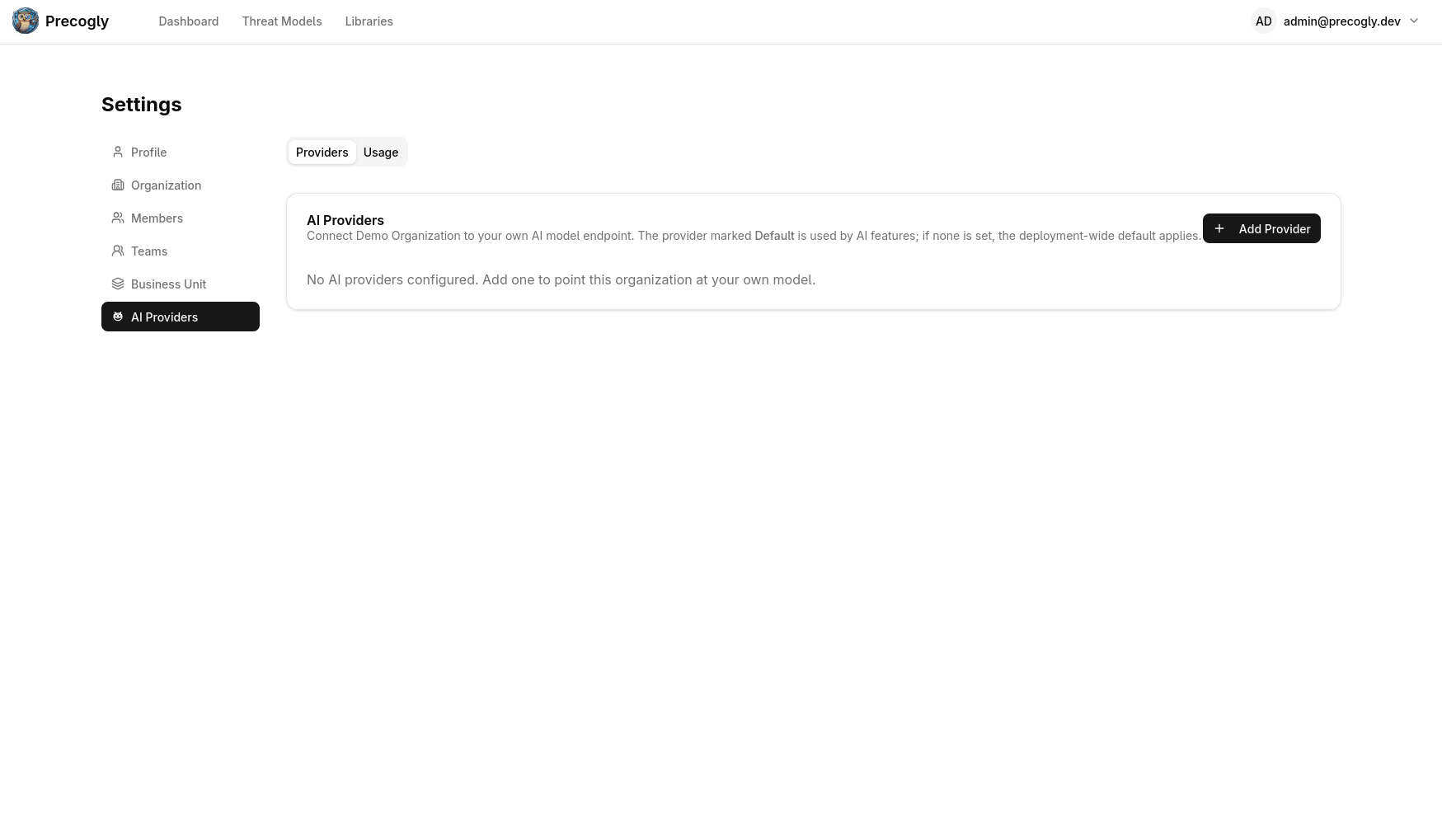
Provider resolution follows a two-tier chain:
- Per-organization config — if the org has saved its own AI provider through the settings UI, that provider is used.
- Operator fallback — the
AI_*environment variables below. Used when an organization has no provider of its own. - Disabled — if neither is configured, AI features return a clear "not configured" response and the UI routes users to the provider setup page.
Environment Variables
| Variable | Default | Description |
|---|---|---|
AI_SUGGESTIONS_ENABLED |
False |
Master switch. Set to True to enable the operator-wide fallback provider. |
AI_BASE_URL |
http://localhost:1234/v1 |
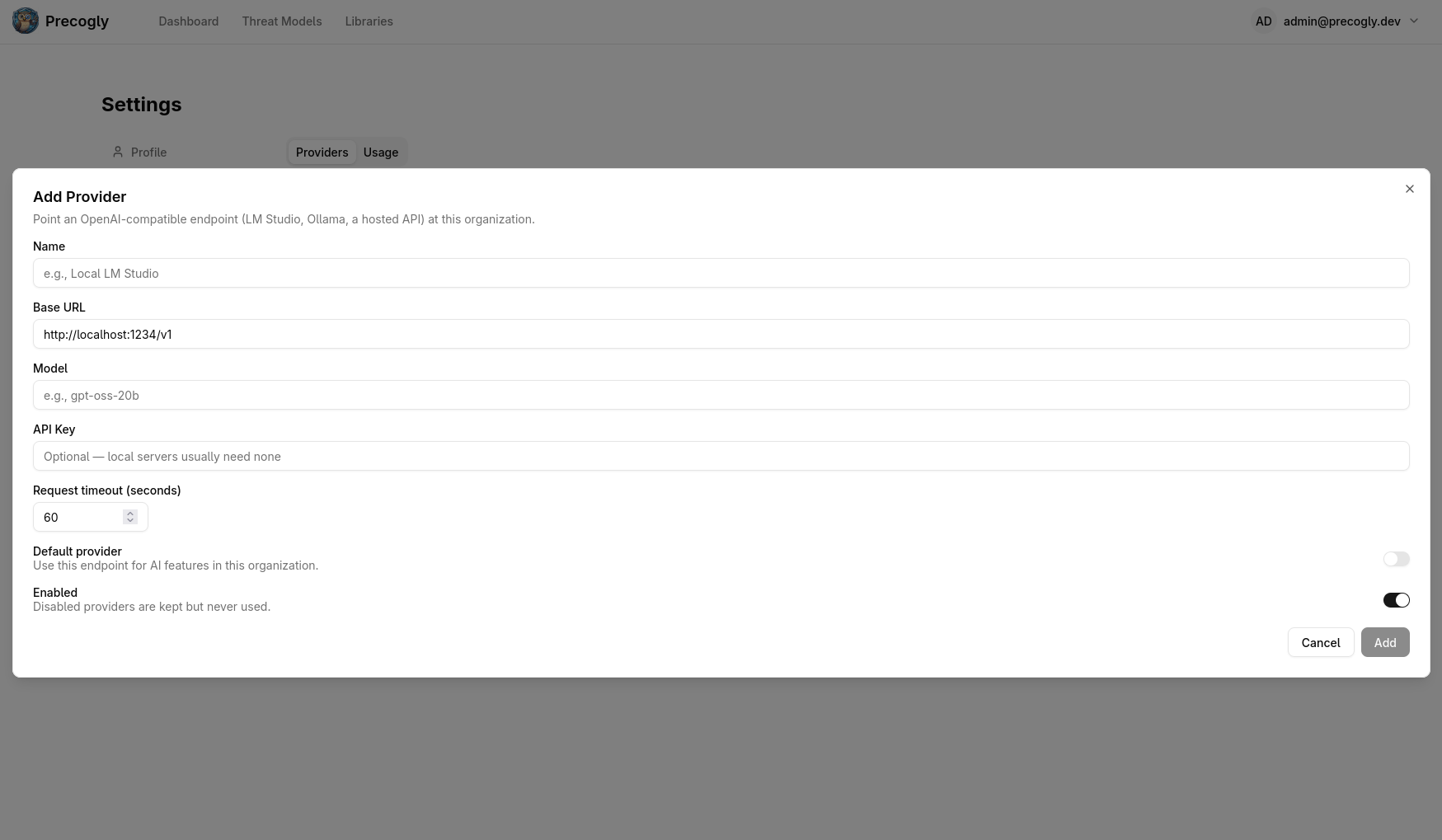
OpenAI-compatible base URL (the root that exposes /chat/completions). |
AI_MODEL |
local-model |
Model identifier sent in the API request. Must match what the endpoint serves. |
AI_API_KEY |
(empty) | API key for the endpoint. Optional — local servers (LM Studio, Ollama) typically don't require one. |
AI_REQUEST_TIMEOUT |
60 |
Seconds before a suggestion request times out. Increase for slower local models. |
AI_SECRET_KEY |
(empty) | Fernet key that encrypts per-organization API keys at rest. Only required when orgs store their own keys via the UI. Generate with python -c "from cryptography.fernet import Fernet; print(Fernet.generate_key().decode())". |
Common Provider Configurations
LM Studio (local, default):
Ollama (local, with OpenAI compatibility):
OpenAI:
AI_SUGGESTIONS_ENABLED=True
AI_BASE_URL=https://api.openai.com/v1
AI_MODEL=gpt-4o
AI_API_KEY=sk-your-key-here
Per-Organization Overrides
Organizations can bring their own model by saving an AI provider config through the settings UI (Settings → AI Providers). This overrides the operator fallback for that organization only. The stored API key is encrypted at rest using AI_SECRET_KEY.
Using AI Suggestions
Once a provider is configured, an owl icon appears next to components in the threat analysis workspace. Click it to get AI-generated threat suggestions for that component.

Generating a DFD with AI
Open a DFD and click Generate in the editor toolbar. Enter the application context, upload a JPEG, PNG, or WebP architecture diagram, review the detected components and flows, then generate the editable DFD. See the DFD editor guide for the full workflow.
Reviewing AI Usage
Organization settings include an AI Usage report with total cost, total tokens, average tokens per call, and usage over time. Breakdowns show usage by feature, user, and model/provider. Self-hosted providers can report token activity without a dollar cost.
Note
AI_SECRET_KEY is separate from Django's SECRET_KEY so it can be rotated independently. Rotating it invalidates any stored per-org API keys, which must then be re-entered.