Threat Model as Code
Precogly lets you export a threat model as structured JSON so you can store it in version control, review changes, and integrate threat modeling into development workflows. Precogly supports two import and export formats:
- TM-Library v1.0 — Precogly's native interchange format and the best choice for moving complete models between Precogly installations.
- CycloneDX 2.0 TM-BOM — an industry-standard format for exchanging threat-model data with the wider CycloneDX ecosystem.
Exporting
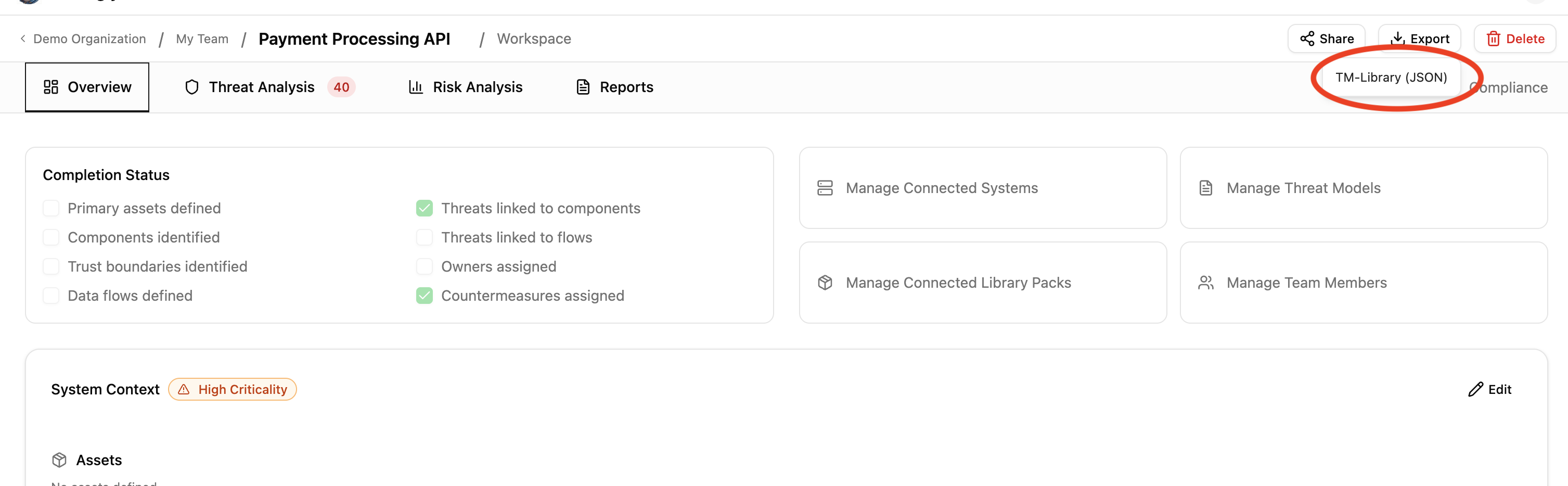
From any threat model workspace, open Export and select either TM-Library
(JSON) or CycloneDX (JSON). TM-Library downloads use a name such as
my-api-threat-model.json; CycloneDX downloads use a name such as
my-api-cyclonedx-tm-bom.json.
TM-Library represents Precogly's complete model most directly, including:
- Scope — name, description, business criticality
- Trust zones and boundaries — with access control and authentication configuration
- Actors, components, and data stores — with trust zone assignments and parent relationships
- Data assets — sensitivity classifications and placements
- Data flows — source, destination, protocol, encryption status
- Threat personas — skill level, intent, resources, objectives
- Threat sources — linked NIST SP 800-30r1 source categories per threat
- Threats — with taxonomy references (STRIDE, CAPEC, CWE, ATT&CK), severity (inherent and residual), and persona/source associations
- Controls — status, priority, and linked threats
- Risks — likelihood, impact, and score
- Assumptions — with validity status
- Extensions — Precogly-specific data (severity scoring metadata, STRIDE/ATT&CK taxonomy, compliance mappings, pack lineage)
Importing
On the Threat Models list page, click Import, select TM-Library or CycloneDX, and drag in the corresponding JSON file (or use the file picker). Precogly creates a new threat model from the entities and relationships it can map.
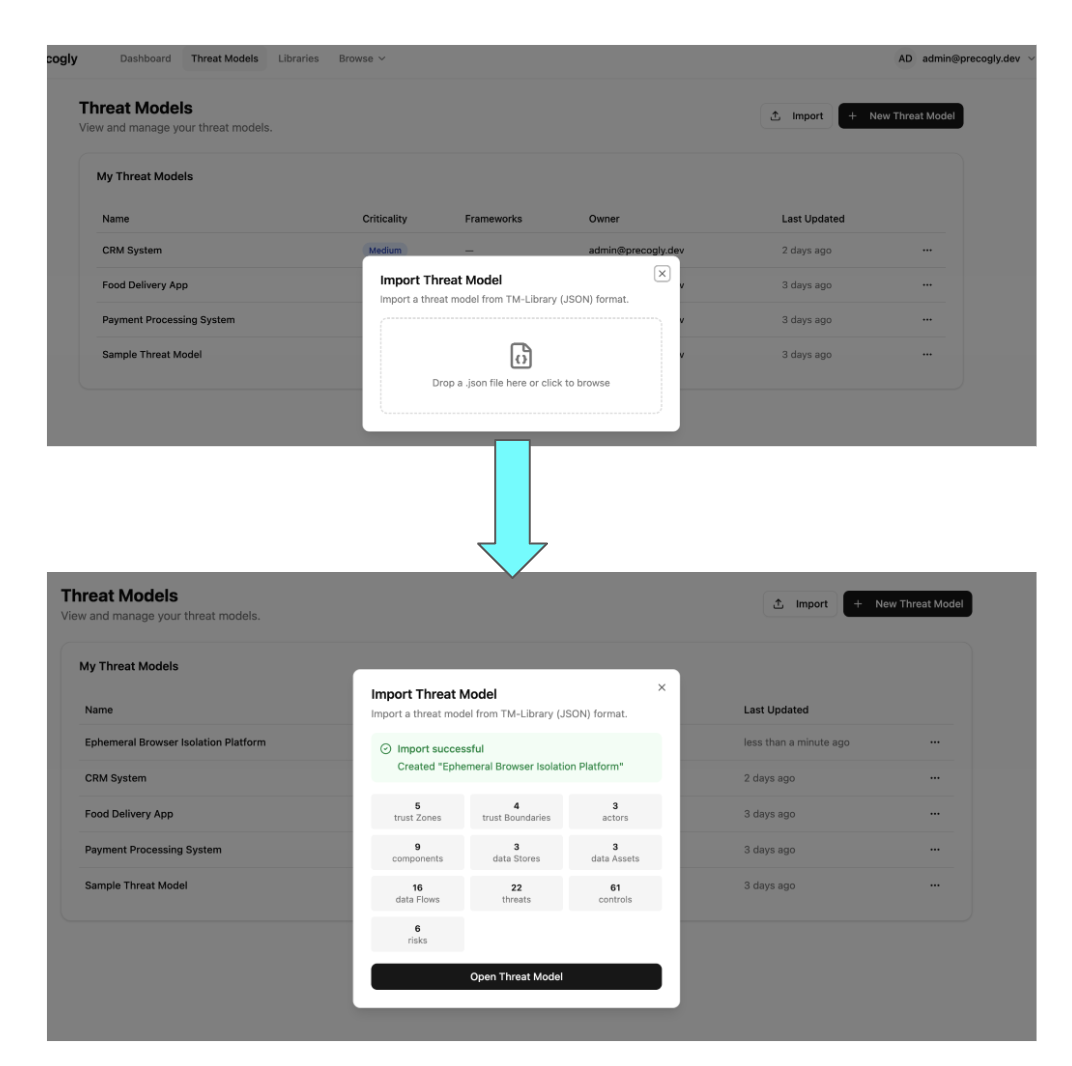
After import, review the summary of created trust zones, components, threats, controls, and other records. The summary also reports references or values that could not be resolved exactly.
TM-Library JSON
The OWASP Threat Model Library format is a structured JSON schema for threat-model interchange. Its top-level structure looks like this:
{
  "version": "1.0",
  "scope": {
    "title": "My API Platform",
    "description": "Public-facing REST API with OAuth2",
    "business_criticality": "high"
  },
  "trust_zones": [...],
  "trust_boundaries": [...],
  "actors": [...],
  "components": [...],
  "data_stores": [...],
  "data_sets": [...],
  "data_flows": [...],
  "threat_personas": [...],
  "threats": [...],
  "controls": [...],
  "risks": [...],
  "assumptions": [...],
  "extensions": { ... }
}
Entities use a symbolic_name (a stable identifier such as comp_api_gateway) to
preserve cross-references across import and export. When editing exported JSON manually,
keep these identifiers unique and update every reference to a renamed identifier.
CycloneDX 2.0 TM-BOM
CycloneDX represents a threat model using BOM metadata, components, services, vulnerabilities, compositions, and formulation blueprints. Precogly maps its entities to those structures and uses BOM references to retain relationships.
Use CycloneDX when another tool consumes or produces CycloneDX BOMs. Use TM-Library when the destination is another Precogly installation or when you need Precogly-specific entities represented as directly as possible.
See Importing and Exporting for the entity mapping, validation rules, filenames, and current format limitations.
Round-trip fidelity
Precogly stores core TM-Library entities—such as threat personas, threat sources,
severity values, and CAPEC/CWE references—as first-class records. Supported source fields
that do not map directly to the database can be retained in format_metadata and emitted
on export.
Precogly-specific analytical data can be carried in extension fields, including STRIDE/ATT&CK mappings, scoring metadata, compliance mappings, and pack lineage. Always review the import summary and compare a re-export when exact fidelity is required, especially when exchanging data with a different tool.
Version control workflows
Because the export is a single, human-readable JSON file, it fits naturally into existing development workflows:
- Git history — commit your threat model alongside code to track how the security analysis evolves with the architecture
- Pull request reviews — diff the JSON to review what changed in the threat model before merging
- Audit trail — tag releases with a snapshot of the threat model for compliance evidence
- Templates — export a well-structured threat model and import it as a starting point for similar projects
Interoperability
Precogly's adapter architecture currently provides TM-Library v1.0 and CycloneDX 2.0 TM-BOM adapters. Both use the same live threat-model records, while each adapter maps those records to the vocabulary and relationship model of its target format.
Sample files
The repository includes ready-to-import sample threat models from the OWASP Threat Model Library project under docs/import-export-formats/Project-TM-Library/:
| File | Description |
|---|---|
husky-ai-threat-model.json |
ML pipeline with data ingestion, training, and inference |
hashicorp-vault-threat-model.json |
Secrets management infrastructure |
cryptocurrency-wallet-threat-model.json |
Crypto wallet with key management and transaction signing |
ephemeral-browser-isolation-threat-model.json |
Browser isolation platform with session management |
kata-containers-threat-model.json |
Container virtualisation isolation layer with threat personas and source references |
Import any of these to explore a fully populated threat model with components, threats, controls, and risks.